Bashinator: Bash Shell Script Framework
Bashinator is a framework for bash shell scripts.
Features
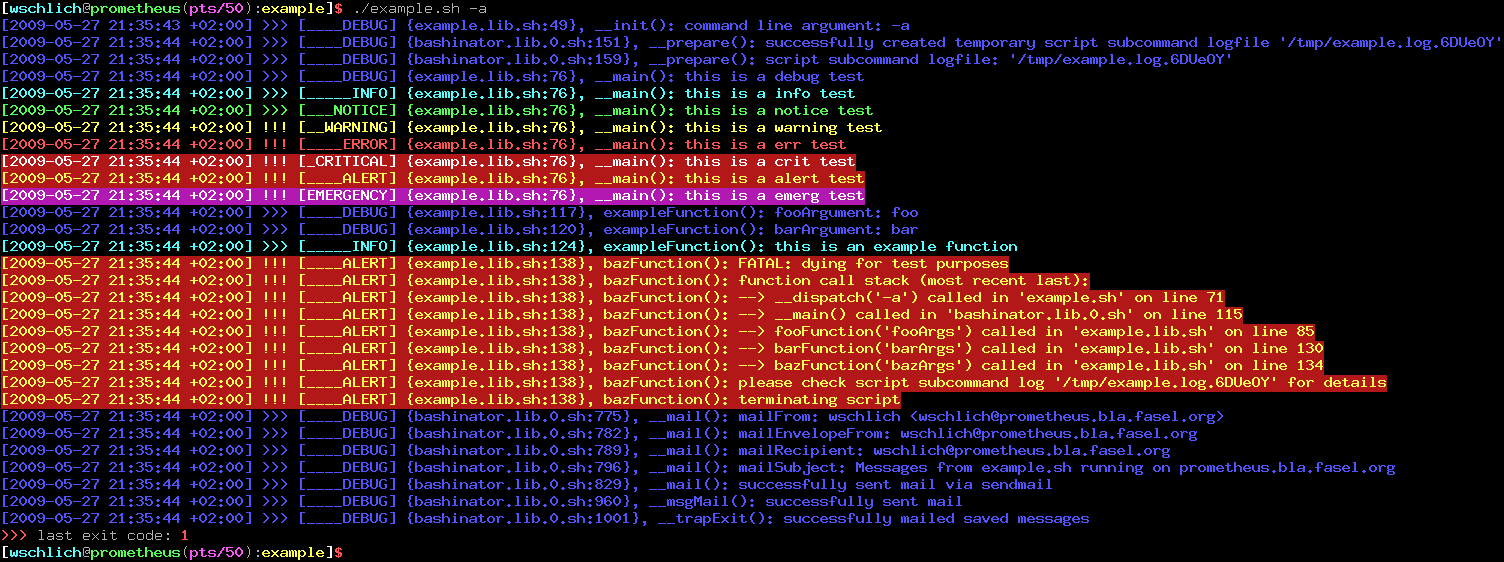
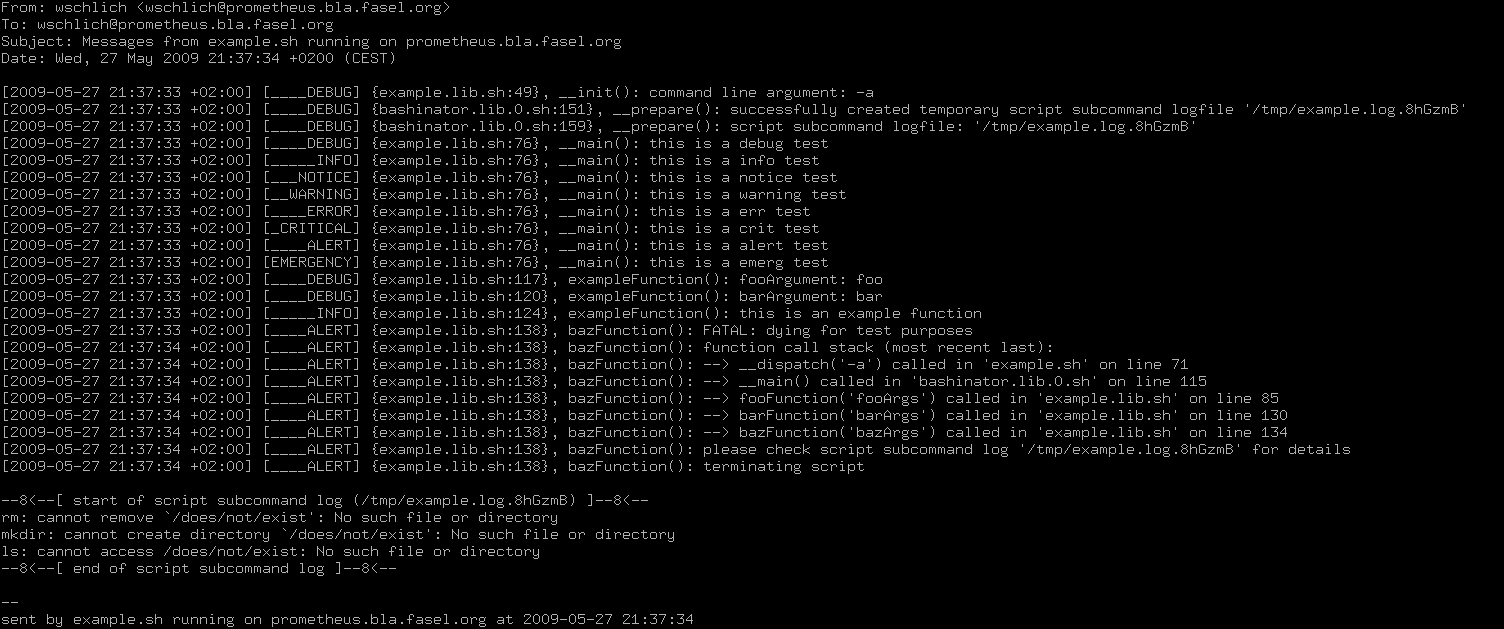
- Flexible and powerful message handling: print, log (to syslog and/or logfile) and mail messages (configurable based on severity) with a single message function, for example:
- Log messages from debug..alert, print messages from info..alert, mail messages from warning..alert
- Log and mail messages with timestamps, print messages without timestamps
- Log to syslog and logfile at once, overwrite or append to the logfile
- Colored output (if printed to a terminal supporting colors, redirected output is not colored)
- Exhaustive information (timestamps, message severity, source file, line numbers and function names) in messages to ease debugging
- Function call stack traces
- Simplifies logging of sub-command output (capturing stdout/stderr of external commands to a dedicated temporary logfile)
- Lockfile handling
- ...and more! ;-)
Quickstart
On Gentoo Linux:
# add the wschlich overlay
layman -a wschlich
# install bashinator
emerge bashinator
# install the bashinator example application from the doc directory to the standard location
install -D -o root -g root -m 0644 /usr/share/doc/bashinator-*/example/bashinator.cfg.sh /etc/example/bashinator.cfg.sh
install -D -o root -g root -m 0644 /usr/share/doc/bashinator-*/example/example.cfg.sh /etc/example/example.cfg.sh
install -D -o root -g root -m 0644 /usr/share/doc/bashinator-*/example/example.lib.sh /usr/share/example/example.lib.sh
install -D -o root -g root -m 0755 /usr/share/doc/bashinator-*/example/example.sh /usr/bin/example.sh
# run the example script
/usr/bin/example.sh -a
On any other Linux:
# download a bashinator release and unpack the package
wget -O bashinator-0.6.1.tar.gz https://github.com/wschlich/bashinator/archive/0.6.1.tar.gz
tar -xzvf bashinator-0.6.1.tar.gz
# install the bashinator library to the standard location
install -D -o root -g root -m 0644 bashinator-*/bashinator.lib.0.sh /usr/share/bashinator/bashinator.lib.0.sh
# install the bashinator example application from the doc directory to the standard location
install -D -o root -g root -m 0644 bashinator-*/example/bashinator.cfg.sh /etc/example/bashinator.cfg.sh
install -D -o root -g root -m 0644 bashinator-*/example/example.cfg.sh /etc/example/example.cfg.sh
install -D -o root -g root -m 0644 bashinator-*/example/example.lib.sh /usr/share/example/example.lib.sh
install -D -o root -g root -m 0755 bashinator-*/example/example.sh /usr/bin/example.sh
# run the example script
/usr/bin/example.sh -a
Documentation
A typical Bashinator-based application file layout looks like this:
# bashinator configuration file
/etc/myapplication/bashinator.cfg.sh
# application configuration file
/etc/myapplication/myapplication.cfg.sh
# application library file containing __init(), __main() and other user defined functions
/usr/share/myapplication/myapplication.lib.sh
# executable application script file based on bashinators example.sh
/usr/bin/myapplication.sh
A typical Bashinator-based application script structure looks like this (see example.sh):
- define basic bashinator variables
- source bashinator library + config
- source application library + config
- boot bashinator via __boot()
- dispatch the application via __dispatch()
- runs __init(): initializes application (command line parsing, argument validation etc.). this function must be defined by the user!
- runs __prepare(): creates sub-command logfile (if configured), checks for and creates lockfile (if configured). this function is defined by bashinator.
- runs __main(): the main application code. this function must be defined by the user!
- runs __cleanup(): removes sub-command logfile (if configured), removes lockfile (if configured). this function is defined by bashinator.
Source and Downloads
Screenshots
Messages of example.sh printed on terminal:
Messages of example.sh sent via mail:
Projects based on Bashinator
Bashinator on the web
Other bash/shell frameworks
There's also a list of bash frameworks/libraries put together by Donnie Berkholz.
Contact/Imprint
This website is operated by Wolfram Schlich, Höhenweg 45A, 53347 Alfter, Germany
Business/consulting inquiries: wolfram.schlich.biz
Last modified: 07. October 2020, 16:58:15 by Wolfram Schlich <wschlich*AT*gentoo*DOT*org>